

Celebrating and encouraging generosity and giving is important all year round, but especially so over the busy season of Advent and Christmas. Here are some top tips from our Giving Team for encouraging generosity from your congregations and visitors in the coming season:
1. Don’t be afraid to ask!
People coming to your Christmas services will expect to be asked for money, so ask confidently. Do you visitors know that your church is entirely self-supporting and that you rely on the generosity of your congregation and visitors to maintain the building, and all do you for your local community?
If you feel uncomfortable making the ask, that will come across – so take a few minutes to write yourself a script and rehearse it.
Don’t forget to point out the impact your church has in your local area – many visitors might think you close the doors after your Sunday services and do nothing else for the rest of the week! So have some examples of your outreach and pastoral care to share.
Make sure visitors know what they are making possible when they make a gift to you this Christmas.
2. Point out ALL the giving options available…
….you never know who might be inspired to give in a different way to what you might expect!
Encourage one-off gifts via your contactless donation device and a QR code for online giving, as well as having a way for people to give (and Gift Aid) cash if they prefer.
But also make sure you have information available about regular giving and legacy giving too – some engaging leaflets near your contactless device would be ideal.
For templates and help with producing engaging literature about regular giving and legacy giving, do contact us on giving@stalbans.anglican.org – we would be delighted to help.
3. Communicate your giving message in a variety of ways.
As well as your verbal ‘ask’ during the service, make sure there is also a visual ‘ask’ in a variety of places.
We have lots of Canva templates for giving icons for your service sheets (see here), Giving posters (see here or here), pew postcards (see here) etc. – get in touch for more information and help creating these, via giving@stalbans.anglican.org
Contactless Giving
4. Make sure you have the best possible contactless device
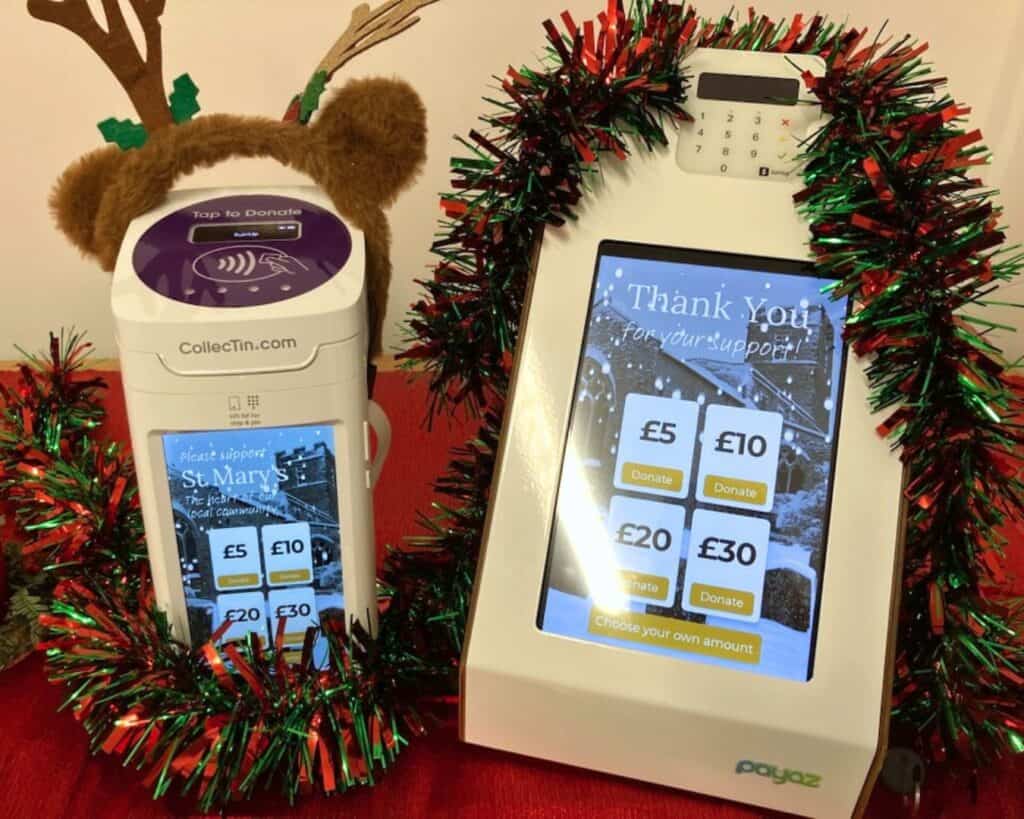
A standalone device with a screen will get significantly more donations than a small handheld SumUp device.
We have small grants available for help with purchasing a device, and a Try Before you Buy scheme which allows you a three-month free trial of a contactless device. We have two devices available to lend out immediately which would be with you over Advent and Christmas, so do get in touch if that is of interest: giving@stalbans.anglican.org
5. Draw attention to your contactless device
Is it well positioned in your church? Remember people donate as they leave, not as they arrive, so position it to be in their line of sight as they are walking out.
Do you have a customised background for your device with a photo of your church? If not, we can make one for you (see here) – even with falling snow for the Christmas season (see here)! Do get in touch if you would like us to help with this.
Online Giving and QR Codes
6. Are you using your QR codes on your service sheets to allow people to give via their mobile phones?
These are free and easy to set up via GiveALittle and SumUp – an online giving page could look something like this example: GiveALittle parish giving page
7. Share your online giving page URL on website and social media
Make sure it is quick and easy for people to give online via your website and social media. Don’t make them hunt for the link…. have it easily accessible on the homepage.
Remember – if you’re sharing your online giving page on your website, social media or by email – use a link/URL and not a QR code. QR codes should only be shared on printed materials (posters, service sheets, banners, postcards etc).
8. Don’t forget to add your Online Donation Page to A Church Near You
A Church Near You gets a huge surge of traffic in December, so don’t miss the opportunity to have your online giving page easily accessible.
When you’re editing your A Church Near You page, go to ‘Marketplace’ in the left hand menu, then toggle the Online Giving section to ‘ON’, and click on ‘Configure Donations’ to add your online giving page URL.
Maximising your Gift Aid
9. Did you know – GiveALittle has a BRAND NEW Gift Aid function that will transform your Gift Aid claims on contactless donations?
This new feature allows your contactless device to ask for a Gift Aid declaration only when the gift is over £30, and not on smaller donations which can be put through GASDS instead.
To switch on this feature, go to your GiveALittle campaign, and under ‘Offer Gift Aid, choose ‘Change’ then ‘Advanced Gift Aid options’. Choose ‘Over 30 only’ and save. If you need any help with this, just contact our Giving Team who can help you out over the phone or a video call – giving@stalbans.anglican.org
Our Christmas Present to your parish….
10. We would like to offer any parish a Zoom call of up to 30 minutes for a chat about giving or help with any of the suggestions we’ve made above.
You might have questions about you contactless device, Gift Aid claims, QR codes, using our Canva templates, making the ask or anything else we might be able to help with.
If that would be useful to your parish, please get in touch via giving@stalbans.anglican.org and let us know some suggested dates/times that might be convenient from Monday – Thursday between 9.30am – 3.00pm, and what areas you would like to cover.
We’d love to chat!